The Virtual Keyboard API Is Broken Where It Matters Most
By Zouhir Chahoud |
Six years ago, a small group of us at Microsoft Edge shipped the first version of the Virtual Keyboard API spec. The problem it solved was simple and real: when a software keyboard appears on a touch device, browsers either resize the window or the visual viewport, and developers have zero control over what happens. For basic pages that’s fine. For anything that has to look and feel app-like (a chat interface, a search bar, a compose box), it’s a mess.
The API gave developers a way to opt in to handling the keyboard geometry themselves. You set navigator.virtualKeyboard.overlaysContent = true, listen for geometrychange events, or use CSS environment variables like env(keyboard-inset-height) to reposition your UI. Clean, both imperative and declarative APIs, works with the platform.
That was February 2021.
It’s now 2026, and the state of this API across browsers is genuinely discouraging.
Safari & Firefox: Still Nothing
Safari does not support the Virtual Keyboard API. At all. No navigator.virtualKeyboard, no geometrychange, no CSS environment variables. Six years after the spec was published, WebKit hasn’t shipped it.
Firefox is in the same position. Mozilla has had an open implementation bug since 2021, still marked as unconfirmed. Their standards position request has been open just as long with no resolution. A Mozilla engineer commented in late 2025 that the spec hasn’t been updated since 2022 and they don’t consider it an interop priority for 2026. There’s no sign of it shipping.
This isn’t some niche feature. In the last few years, companies have poured tens of millions of dollars into building chat interfaces. Every major AI product has a text input pinned to the bottom of the viewport. That’s the UI pattern of this era, and on Safari and Firefox, developers are still guessing at the keyboard height using visualViewport resize heuristics and window.innerHeight tricks that break in subtle, device-specific ways.
Chrome on Android: It Ships, But It’s Broken
Chrome, and other Chromium based browsers, on Android do support the Virtual Keyboard API. You’d think that after years of being available, the core event, geometrychange, would report accurate geometry.
It doesn’t.
The Overshoot Bug
When you open the keyboard, Chrome fires geometrychange multiple times as the keyboard animates in. The spec doesn’t explicitly describe this; its algorithm says to wait for the keyboard to be “shown by the system,” then fire a single event. But the intent is presumably to let developers track the keyboard’s position during the animation and smoothly reposition content as it slides up.
In practice, the stream of intermediate values isn’t particularly useful. You often get repeated identical values rather than a smooth ramp of distinct heights. But the real problem isn’t the event cadence. It’s that the reported height overshoots the final settled value, then drops back down:
geometrychange → 343px
geometrychange → 343px
geometrychange → 392px  ← overshoots
geometrychange → 392px
geometrychange → 343px  ← settles back down
geometrychange → 343px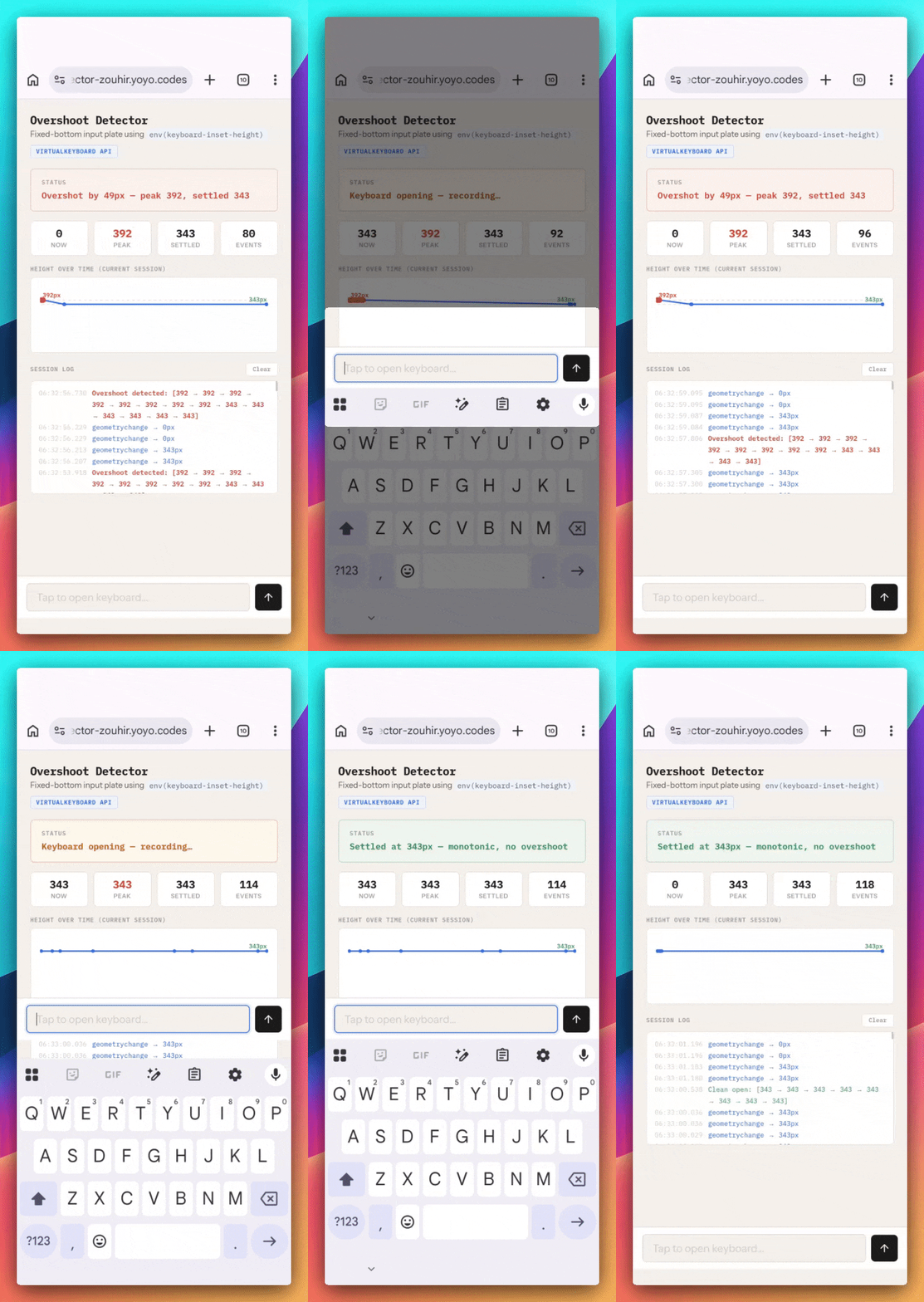
The keyboard geometry spikes past its actual resting height, then corrects. If you’re using that value to position UI, whether through CSS environment variables or JavaScript, your layout visibly jumps.
The bug is in the geometry values the API reports, not in how they’re consumed. It doesn’t matter what CSS layout you use.

Open on your phone to see the overshoot bug in action. Records peak vs settled keyboard height and flags any overshoot.
https://vkb-overshoot-detector-zouhir.yoyo.codes”Just use JavaScript — debounce it, batch it in rAF.”
The natural instinct is to bypass the CSS environment variables entirely: read boundingRect.height in the geometrychange handler, maybe batch your layout updates in requestAnimationFrame, and control the timing yourself. This doesn’t help — the problem isn’t in CSS plumbing or when the value is applied, it’s that boundingRect.height itself overshoots. You’re just applying a bad value on a tighter schedule — no amount of rAF discipline fixes incorrect data from the source.
The next move is usually debouncing: ignore intermediate values, wait for the geometry to stabilize, apply it once. This does avoid the overshoot, but it defeats the purpose of the API. The whole reason geometrychange fires a stream of events during animation is to let you smoothly track the keyboard as it slides in. Debouncing reduces that to a single delayed callback — the keyboard appears, there’s a dead pause, and then your UI snaps into position. You’ve opted in to a lower-level API for smooth tracking and then disabled the tracking.
There’s also a practical problem: you don’t know what “settled” means. Is 300ms enough? 500ms? It depends on the device, the keyboard app, whether animations are enabled, whether a prediction bar loads asynchronously. There’s no signal from the API that marks the final geometry — you’re writing timing heuristics to paper over values that should be correct in the first place.
Neither approach is a real solution. The values the API reports during animation should increase monotonically toward the final height, not spike past it and correct. This is a platform bug.
boundingRect Is in the Wrong Coordinate Space
While building the test demos for the overshoot bug, I stumbled into something else. I wrote an inspector page that displays the raw boundingRect values from JavaScript alongside the CSS keyboard-inset-* environment variables, and compared both to what the spec says they should be.
The spec defines boundingRect as “the intersection of the virtual keyboard with the layout viewport in client coordinates.” For a standard docked keyboard on a phone, that means boundingRect.y should equal viewportHeight - keyboardHeight, the keyboard’s top edge measured from the top of the layout viewport. And for a keyboard sitting flush at the bottom of the screen, boundingRect.x should be 0 and the rect’s bottom edge should align with the viewport’s bottom edge.
Here’s what Chrome on Android actually reports, on a device with a 411×777 layout viewport and a 343px keyboard:
| Property | Actual | Expected | |
|---|---|---|---|
.x | 0 | 0 | ✓ |
.y | 66 | 434 | Δ368 |
.width | 411 | 411 | ✓ |
.height | 343 | 343 | ✓ |
.top | 66 | 434 | Δ368 |
.right | 411 | 411 | ✓ |
.bottom | 409 | 777 | Δ368 |
.left | 0 | 0 | ✓ |
Every vertical coordinate is off by exactly 368 pixels, the rect was certanly not reported relative to the layout viewport as the spec requires. .y and .top point to the wrong place, .bottom doesn’t reach the viewport’s bottom edge, and the keyboard rect no longer describes a rectangle that makes geometric sense within the coordinate space it’s supposed to use.
The horizontal values (.x, .width, .right, .left) are all correct because there’s no horizontal browser chrome offset to throw them off.
CSS Insets Aren’t Insets
The problem cascades. The W3C spec defines six CSS environment variables (keyboard-inset-top, keyboard-inset-right, keyboard-inset-bottom, keyboard-inset-left, keyboard-inset-width, and keyboard-inset-height) and says they “define a rectangle by its top, right, bottom, and left insets from the edge of the viewport.”
Insets. From the viewport edge. Just like safe-area-inset-*.
For a docked keyboard sitting flush at the bottom of the screen, the expected inset values are straightforward: keyboard-inset-top should be viewportHeight - keyboardHeight (the gap above the keyboard), keyboard-inset-bottom should be 0 (no gap below), keyboard-inset-left and keyboard-inset-right should both be 0 (full width), and keyboard-inset-height should be the keyboard height.
Instead, Chrome appears to be copying the raw boundingRect coordinates directly into the CSS environment variables without converting them to insets:
| Inset | Actual | Expected | |
|---|---|---|---|
top | 66px | 434px | Δ368 |
right | 411px | 0px | Δ411 |
bottom | 409px | 0px | Δ409 |
left | 0px | 0px | ✓ |
width | 411px | 411px | ✓ |
height | 343px | 343px | ✓ |
keyboard-inset-top reports 66px: that’s boundingRect.y and not the distance between the visual viewport’s top point and the Virtual Keyboard’s top. keyboard-inset-bottom reports 409px: that’s boundingRect.bottom (the bottom edge coordinate of the rect), not the bottom inset. keyboard-inset-right reports 411px: that’s boundingRect.right, not a right-edge inset.
The only CSS variables that happen to work correctly in practice are keyboard-inset-height and keyboard-inset-left, because the keyboard’s height is the same regardless of coordinate space, and the left offset happens to be 0 in both the correct and incorrect interpretations. That’s why the common pattern of bottom: env(keyboard-inset-height) works.

Side-by-side comparison of actual vs expected values for boundingRect and CSS env() insets. Open on Android Chrome to see the discrepancies.
https://vkb-inset-inspector-zouhir.yoyo.codesWhy This Matters
Native apps on iOS and Android have had reliable keyboard avoidance APIs for over a decade. When you build a chat app natively, you get precise keyboard height, smooth animations, and the ability to pin your input bar exactly where it needs to be. The Virtual Keyboard API was supposed to bring that same level of control to the web.
Instead, we have three compounding problems in Chrome on Android (the only browser that ships this API at all):
- The geometry overshoots during animation: the API reports values that spike past the keyboard’s actual resting height.
boundingRectis in the wrong coordinate space, including browser chrome offsets that shouldn’t be there.- The CSS environment variables aren’t proper insets: they’re raw rect coordinates mislabeled as insets. The only value that works correctly (
keyboard-inset-height) does so by coincidence.
And Safari and Firefox? Six years in, still nothing.
Developers building chat interfaces (and there are a lot of them right now) are stuck choosing between native wrappers, unreliable heuristics, or just accepting that the mobile web experience will be worse.
That’s not a great place to be in 2026.
What Needs to Happen
I don’t have a workaround to offer here, and I don’t think I should need one. These are platform bugs.
If you’ve hit any of these, star the Chromium bugs linked below.
And to the Safari, WebKit, and Firefox teams: this API has been specced and in discussions for years. The use cases are not theoretical; they’re every chat app on the internet. Ship it.
If you’ve been fighting keyboard geometry on the mobile web — the API is just not there yet. It’s not your code.
I helped author the original Virtual Keyboard API explainer while working on Microsoft Edge. The interactive demos referenced in this post are available here: overshoot detector and inset inspector.
Chromium bugs filed:
- crbug.com/493412612 — VirtualKeyboard
geometrychangereports heights that overshoot the final resting value - crbug.com/493415366 — CSS
keyboard-inset-*environment variables contain rect coordinates, not viewport insets - crbug.com/493416495 — VirtualKeyboard API reported
boundingRectis in the wrong coordinate space